
Nonprofit Financial Reports
Your Board Can Actually Follow
Turn your accounting data into reports and dashboards that help your board understand the big picture and your finance team see the detail behind it.
- Board-ready reports
- Customizable dashboards
- Budget and cash visibility


Give your board clarity
not just numbers
Bring charts, financial statements, and commentary together in a report your audience can follow. Explain what changed, add context, and focus the conversation on what matters to your mission.
- Put the big picture and supporting detail together.
- Shape the presentation for your audience.
- Build a foundation for the next reporting cycle.


Northstar Pathways Alliance · Sample reports and dashboards created in Reach Reporting.
See the picture
understand the detail
Bring financial position, costs, and income into organized dashboards. Spot changes and prepare for the questions your board and management team will ask.
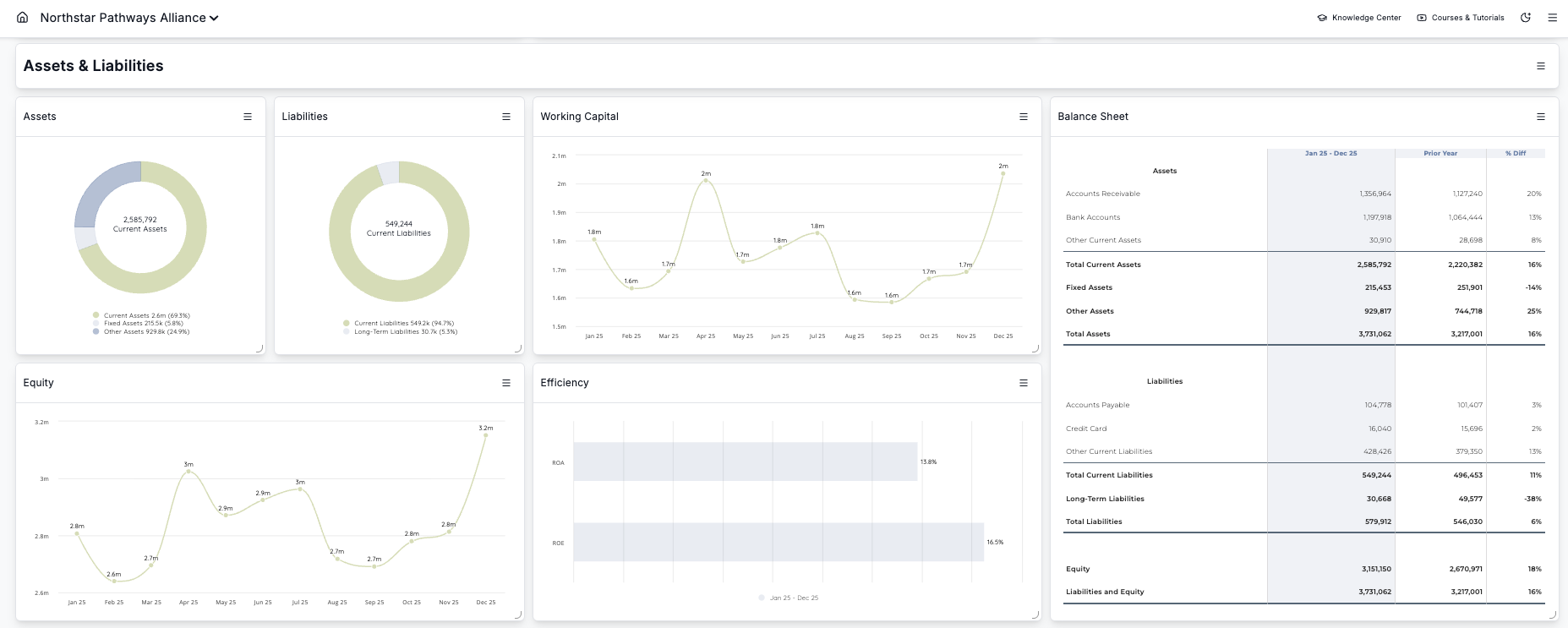
See what changed.
Compare periods and put current results in context.
Focus the discussion.
Bring the right financial questions to your next meeting.
Make detail approachable.
Help your audience follow the story behind the figures.
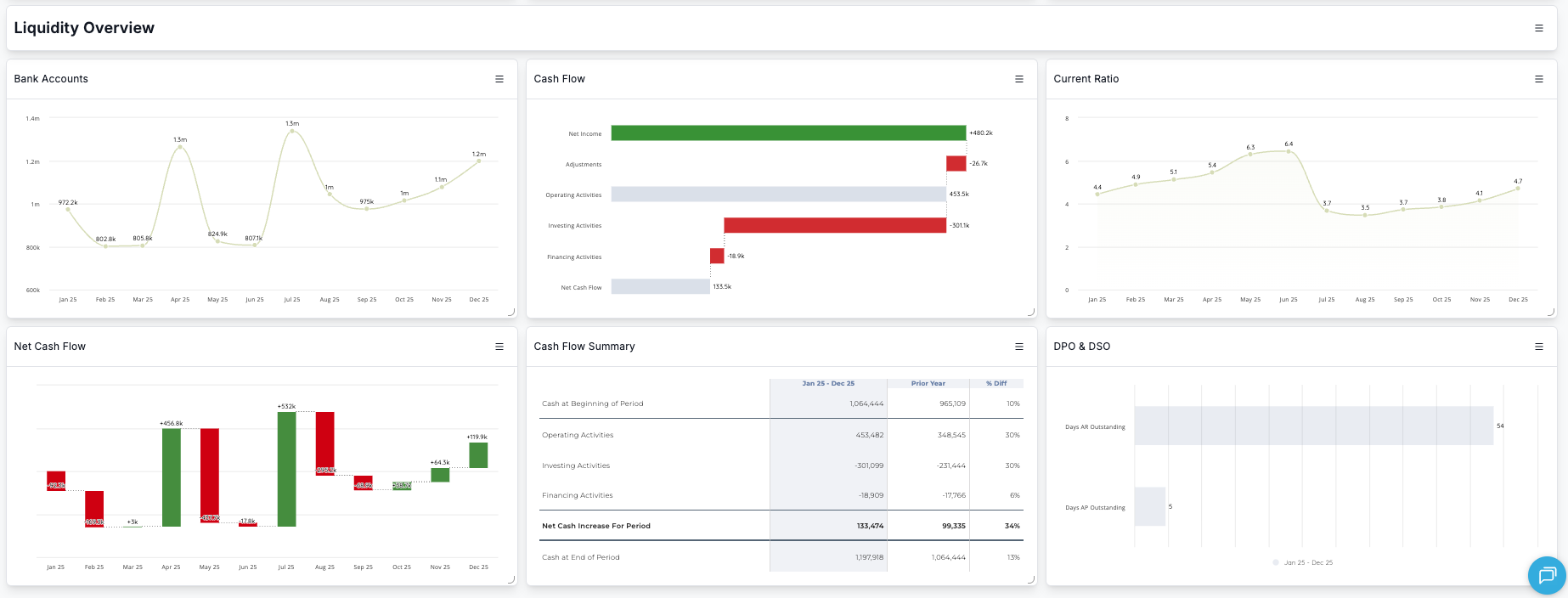
Make cash movement
easier to explain
Show the activity behind your cash balance alongside income and expenses. Give your team a clearer view of where money is moving and what needs a closer look.
Bring visual comparisons and explanation into the same report, so the conversation can move from reading numbers to understanding them.


How nonprofits use financial reporting tools
Reach Reporting helps nonprofit organizations maintain financial clarity in four steps:
- Connect financial data from QuickBooks Online, QuickBooks Desktop, Xero, Digits, Google Sheets, MYOB, Gusto, Excel, or CSV files.
- Standardize nonprofit financial reporting across funds, programs, and periods.
- Forecast cash flow and budget performance to plan for sustainability and growth.
- Use dashboards and AI insights to communicate financial health clearly to leadership and boards.
What is nonprofit financial reporting?
Nonprofit financial reporting is the structured presentation of fund-based financial data designed for board oversight, donor transparency, and regulatory compliance.
From your books
to your next board meeting
Start with your data.
Connect your accounting system or use a supported import. Review the details your organization needs.
Build the right view.
Arrange reports, charts, and commentary for your board and management team.
Prepare the conversation.
Review your results and share a financial story that makes the next discussion more useful.
Get clear on setup. A guided tour helps you explore the workflow, discuss your accounting structure, and understand how to get started.
Your organization. Your reporting.
Keep your books
expand the view
Add reporting, dashboards, budgeting, and forecasting around the financial data you already maintain.
Accounting and payroll integrations
Connect QuickBooks Online, QuickBooks Desktop, Xero, Digits, MYOB, and Gusto. Bring in live data from Google Sheets, or upload a CSV trial balance exported from Microsoft Excel.
Budget comparisons and planning
Bring actuals, budgets, and your financial outlook into the reporting conversation.
Program and department detail
Your accounting structure determines the reporting dimensions available. Review the views you need during your tour.
What Reach customers say about reporting
See why other financial professionals choose Reach.

“This is such an easy add in to use and links with the data in Xero seamlessly. The team have been great at supporting us and getting us started.”
Emma Gardiner · Finance leader
“Reach is so delightful to use and is such a game-changer when providing client service.”
Danielle Wright · Finance leader
“Reach Reporting has been a transformative tool in my financial planning and analysis work. Its user-friendly interface stands out for its intuitiveness and ease of navigation.”
Anne Nicole Suba · FP&A
“I've recently started using this tool for automating financial reporting, and it's been a game-changer. The automation features have significantly streamlined our reporting processes.”
Marinella Claudio · Finance leader
“Love how Reach easily pulls into QBO and its ease of use! Would love to see a commenting feature for clients to leave comments on their numbers!”
Matthew Ratsimbajaona · Finance leader
“New user to Reach however amazing experience”
Smita Dias · Finance leader
SIMPLE, PUBLIC PRICING
Start with the complete Reach platform
Every new account begins with 30 days of access to the complete Reach Reporting platform.
After your free trial, continue with the complete platform starting $149 per month. If you do not subscribe, your account automatically moves to Reach Basic.
No credit card required. No need to cancel.
Complete Reach Reporting
A few practical questions
Know what comes next
Does Reach replace our accounting software?
No. Your accounting system remains the source of your books. Reach adds reporting, dashboards, budgeting, and forecasting around your financial data.
Can we report on class or department and/or location?
Yes. Reach Reporting can report by class, department, and location when those dimensions are available in your connected accounting data. You can use them to filter financial statements, metrics, dashboards, budgets, and forecasts so you can analyze performance by individual business unit, team, location, or other segment.
What will we see in a guided tour?
A walkthrough of the product, examples of reports and dashboards, and a discussion of your accounting setup and reporting needs.
Can we explore Reach ourselves?
Yes. Start a free trial to explore the product yourself. Current trial terms are provided during signup.