
COMPARE FATHOM AND REACH REPORTING
FathomHQ vs.
Reach Reporting
Fathom provides a structured financial-analysis and reporting experience. Reach gives you more control over how your reports, dashboards, metrics, and financial plans reflect the way your business is managed.
- Automated financial reporting and analysis
- Customizable dashboards and reports
- Connected 3-way forecasting
Trusted across leading accounting platforms and software marketplaces
FROM RAW DATA TO A DECISION
Turn financial data into decisions
Connect, automate, customize, understand, and plan—all from one financial reporting workspace.
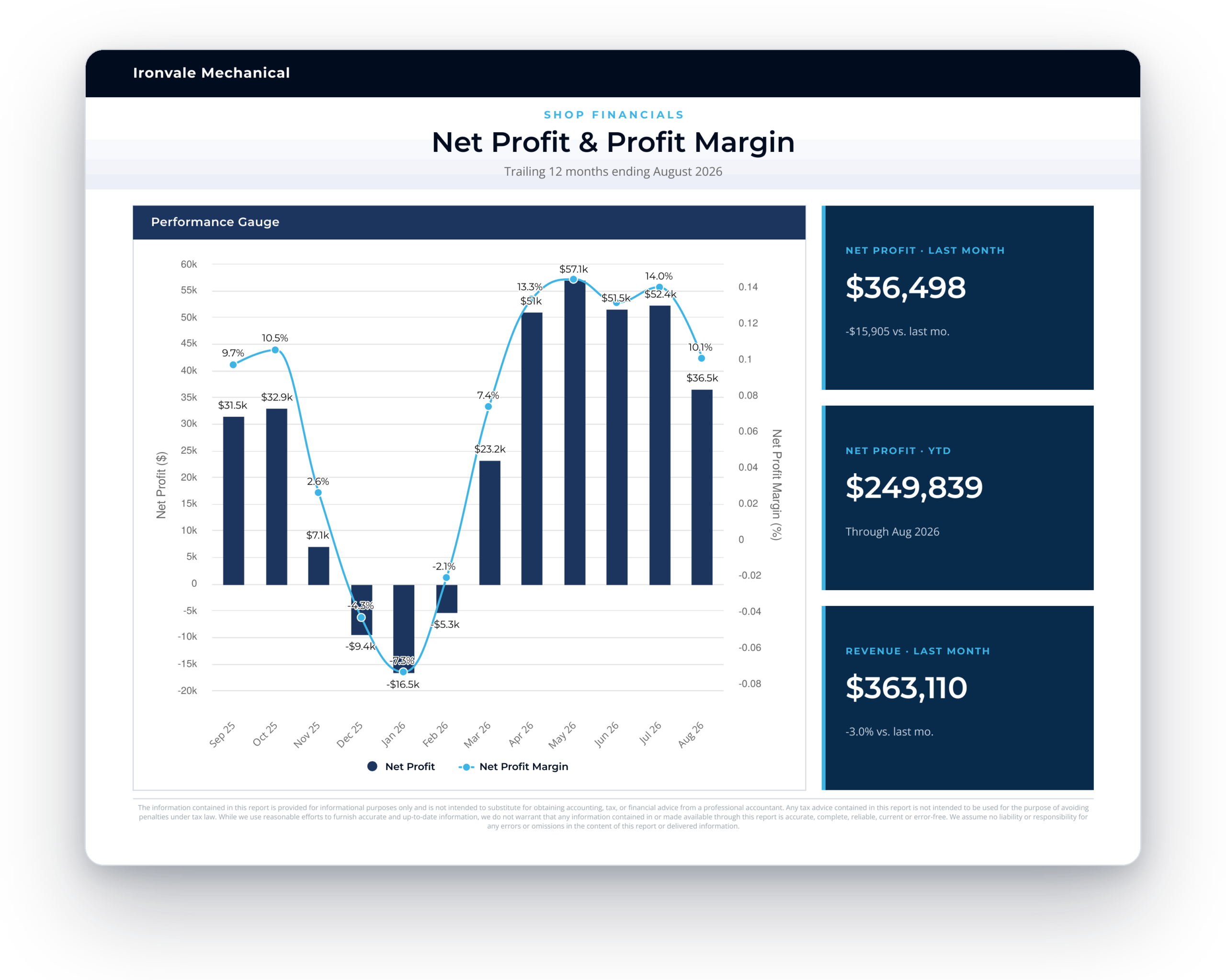
Connect your data
Connect QuickBooks, Xero, Digits, MYOB, use a spreadsheet, or upload a CSV trial balance. Bring financial, non-financial, and operational data together.
Automate repeatable work
Start with pre-built reports and dashboards, sync current data, and reuse the work every month.
Make reports your own
Shape statements, KPIs, charts, comparisons, live text, branding, and complete financial decks.
Understand what the numbers are telling you
Use interactive metrics, variance analysis, drill-down, and clear context to understand performance and make better-informed business decisions.
Plan all three statements
Budget and forecast the P&L, balance sheet, and cash flow together, then test the drivers.
Scale reporting when you need to
Keep pace with changing business requirements, as Reach adapts with minimal manual intervention. Templates scale to support expanding reporting workloads and analytics needs.
SIDE-BY-SIDE
A comparison built for an actual decision
Fathom and Reach Reporting both help you turn accounting data into reports, dashboards, analysis, budgets, and forecasts.
The difference is how much control you want over the result.
Report building Reach Reporting supports Report building Fathom supports Report building
More control. Start with templates, then shape layouts, calculations, visuals, and live text on one canvas.
Build Pro Reports from financial statements, charts, KPI tables, text, and reusable templates.
Native financial statement customization Reach Reporting supports Native financial statement customization Fathom supports Native financial statement customization
Unlock statements for one-off layouts, or keep locked statements presentation-ready while numbers refresh with Book Month.
Group accounts under headings in Chart of Accounts settings, then shape Profit & Loss and Balance Sheet tables inside Pro Reports.
Account mapping Reach Reporting supports Account mapping Fathom supports Account mapping
Override the company-wide chart of accounts for reporting without changing bookkeeping. The Account Mapping Tool feeds the Data Picker and locked statements. Mapping is unavailable for CSV and MYOB connections.
Reclassify and rearrange accounts in Chart of Accounts settings for reporting and consolidations. This is Fathom’s classification workflow, not a separate Reach-style Account Mapping Tool.
3-way planning Reach Reporting supports 3-way planning Fathom supports 3-way planning
Connect Profit & Loss, Balance Sheet, and Cash Flow in one plan. Assumption changes flow through to projected ending cash.
Build connected 3-way forecasts with baseline methods, forecast drivers, Balance Sheet schedules, and scenarios.
Supporting data across reporting and planning Reach Reporting supports Supporting data across reporting and planning Fathom partially supports Supporting data across reporting and planning
Bring non-accounting inputs into reports, dashboards, and plans with company data sheets and planning data sheets, plus linked Google Sheets where you use them.
Add non-financial KPIs and forecast drivers, with Excel or Google Sheets imports for sources outside Fathom’s direct connectors.
Scenario modeling Reach Reporting supports Scenario modeling Fathom supports Scenario modeling
Duplicate budgets or forecasts for base, upside, and downside cases. Vary planning Data Sheet assumptions without rebuilding the model.
Layer microforecasts and scenarios to model hires, purchases, loans, projects, and other events on a baseline forecast.
Client delivery and collaboration Reach Reporting supports Client delivery and collaboration Fathom supports Client delivery and collaboration
Share reports, dashboards, budgets, and forecasts through a dedicated Client Portal with folders, alerts, and PDF download for reports.
Publish Pro Reports for client or viewer users, with comments and downloadable PDFs from the Fathom experience.
Interactive dashboards for client users Reach Reporting supports Interactive dashboards for client users Fathom does not include Interactive dashboards for client users
Publish interactive dashboards to the Client Portal or shareable links, with filters, exports, and AI analysis where you enable them.
Client and viewer users can open published Pro Reports. They cannot access Fathom’s Insights Dashboard.
Multi-entity and multi-currency consolidations Reach Reporting supports Multi-entity and multi-currency consolidations Fathom supports Multi-entity and multi-currency consolidations
Combine compatible companies into one reporting view, with mapping and multi-currency conversion where supported.
Consolidate up to 300 companies in a single-currency group, or up to 50 in a multi-currency group, across supported sources.
Eliminations Reach Reporting supports Eliminations Fathom supports Eliminations
Zero out designated intercompany accounts in a consolidation. Reach eliminates full account balances; Cash Flow still shows eliminated accounts today.
Apply automated full-account eliminations, plus manual full or partial eliminations through an Eliminations Company when you need amount-level control.
Custom branding Reach Reporting supports Custom branding Fathom supports Custom branding
Apply company or workspace logos and color themes to reports and dashboards inside the Reach experience.
Add organisation and company logos, header backgrounds, and brand colours on Pro Reports and Summary Reports.
White label Reach Reporting supports White label Fathom supports White label
Replace Reach app identity with your logo, favicon, and custom subdomain. Paid premium service with a $2,500 one-time setup.
Request additional white-label branding for a custom-branded login experience, custom subdomain, and branded emails through Fathom support.
Benchmarking Reach Reporting supports Benchmarking Fathom supports Benchmarking
Benchmark with peer consolidations, imported industry data, KPI goals or ranges, budgets as targets, and conditional formatting.
Create benchmark groups to compare and rank companies or divisions in your account. Fathom does not ship an external industry benchmark database.
AI enhancement Reach Reporting supports AI enhancement Fathom supports AI enhancement
Analyze metrics, generate report and dashboard deliverables, and build dashboard widgets with Claude where enabled.
Use Commentary Writer to draft report commentary from selected report components, with source attribution for figures.
QuickBooks Online Reach Reporting supports QuickBooks Online Fathom supports QuickBooks Online
Direct cloud connection with overnight auto-sync and manual sync.
Direct QuickBooks Online connection among Fathom’s cloud accounting integrations.
QuickBooks Desktop Reach Reporting supports QuickBooks Desktop Fathom supports QuickBooks Desktop
Direct connection through the Reach Desktop Connector on the machine holding the company file.
Direct QuickBooks Desktop connection through the Fathom Desktop Connector.
Xero Reach Reporting supports Xero Fathom supports Xero
Direct cloud connection with auto-sync about every 24 hours and manual sync.
Native Xero connection for financials used across analysis, reports, and forecasts.
MYOB Reach Reporting supports MYOB Fathom supports MYOB
Direct cloud connection. Several data types are not synced; Account Mapping Tool is unavailable.
Connect MYOB Business (cloud) or MYOB Desktop through Fathom’s documented MYOB paths.
Gusto Reach Reporting supports Gusto Fathom does not include Gusto
Direct payroll connection for employee and contractor metrics, with nightly auto-sync.
Gusto is not listed among Fathom’s direct integrations.
Digits Reach Reporting supports Digits Fathom does not include Digits
Direct Digits connection for financial statements used in reporting, dashboards, and 3-way forecasts.
Digits is not listed among Fathom’s direct integrations.
CSV trial balance import Reach Reporting supports CSV trial balance import Fathom supports CSV trial balance import
Upload a trial balance CSV to build the three main statements. NetSuite, Sage Intacct, Wave Accounting, FreshBooks, Zoho Books, ZipBooks, and other accounting systems can be formatted as a trial balance CSV and uploaded into Reach Reporting.
Import financials from Excel or CSV using Fathom’s templates when a system is outside the direct connector list, including multi-period Profit & Loss and Balance Sheet uploads.
Google Sheets integration Reach Reporting supports Google Sheets integration Fathom supports Google Sheets integration
Link a native Google Sheet for metrics and live text, with manual sync plus documented nightly sync.
Import company financials from Google Sheets with manual or automatic updates about every 24 hours.
Microsoft Excel imports Reach Reporting supports Microsoft Excel imports Fathom supports Microsoft Excel imports
Upload Excel as a Data Sheet and re-upload when figures change. This is a manual path, not a live Excel connection.
Import company financials from Excel using Fathom’s import template, with bulk import available for Excel-sourced companies.
Onboarding and implementation Reach Reporting supports Onboarding and implementation Fathom supports Onboarding and implementation
Get guided onboarding, implementation help, and live training shaped around your reporting needs.
Use self-guided setup, Help Centre workflows, and onboarding resources, with extra help available from Fathom support.
Live one-on-one support Reach Reporting supports Live one-on-one support Fathom supports Live one-on-one support
Reach a person by live chat, email, phone, or Zoom when you need troubleshooting or a better build path.
Contact Fathom by in-app messenger, email, or regional phone lines when you need live help.
Training as you grow Reach Reporting supports Training as you grow Fathom supports Training as you grow
Continue with webinars, tutorials, and personalized training as you add users, clients, and advanced workflows.
Continue with webinars, learning resources, and Advisor Certification as your team expands.
Choose Reach if...
You want reporting to fit your business
You want reports and dashboards shaped around how your business is managed.
You want reporting, analysis, budgeting, and forecasting in one connected workflow.
You need to combine financial and operational data in custom metrics and reports.
You want to start with one company and add more advanced capabilities as your needs grow.
CHOOSE FATHOM IF…
You prefer a more standardized approach
You want a structured reporting and financial-analysis workflow.
A large library of predefined charts and financial KPIs is more important than deeper customization.
You prefer to forecast individual business events using microforecasts.
You need purpose-built comparison and ranking across a group of businesses.
From people who compared both
What people who evaluated Fathom say about Reach
See why people chose Reach Reporting over Fathom.

Very customizable
“Being able to customize just about anything in one reporting system is a huge improvement from our current platform Fathom.”
Jim P. · Controller
Fast, custom reporting
“I had several custom reports I needed and they were able to help me create exactly what I needed for my financial reviews and budgets.”
Sujan J. · Assistant Manager, Accounting
Professional reporting
“Reach is easy to use and provides professional reporting the banks love.”
Taylor M. · Financial Operations Manager
Highly customizable, built to last
“More customizable reporting and consolidated reporting was more streamlined.”
Aaron K. · CFO
Strong budgeting and forecasting
“I found Reach just as strong as these tools, but far easier to use.”
Brian M. · Director of Accounting Services
Smooth QBO-to-report workflow
“The interface was much easier and the reporting looked much better. It was also much more flexible.”
Joni P. · Business Advisory Manager
Reporting
Structured reporting or more room to customize?
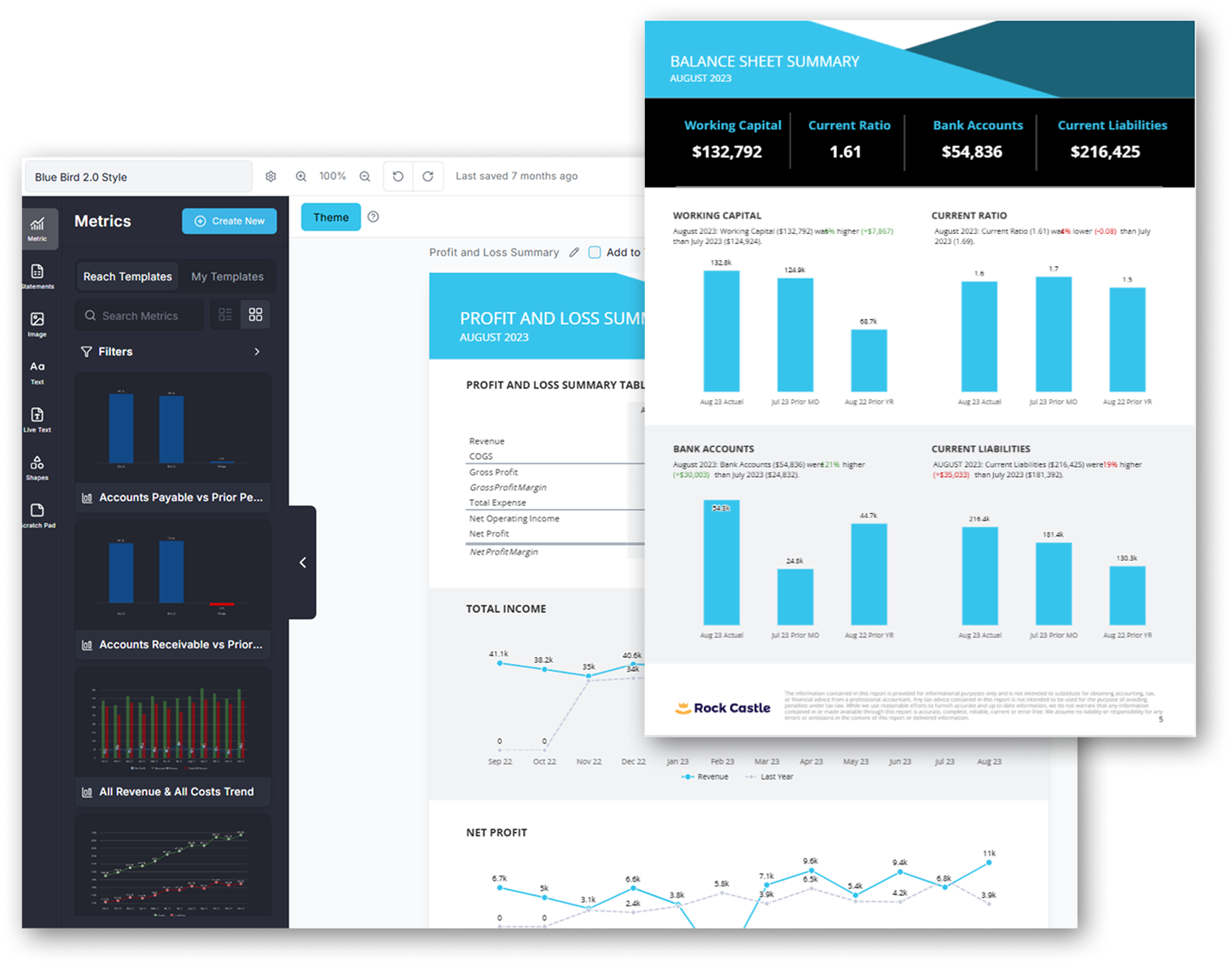
Fathom and Reach both turn accounting data into polished financial reports. The difference is how much freedom you have to shape the result.
Fathom favors consistency. Its structured editor, ready-made charts, financial statements, KPIs, and reusable templates help teams produce standardized management reports.
Reach gives you more control. Start with a proven template, then customize the layout, metrics, calculations, account groupings, visuals, live text, and supporting business data. Keep statements connected to the accounting system—or unlock them when the business needs a more tailored view.
Forecasting
Two approaches to 3-way forecasting
Both Reach and Fathom connect the profit and loss, balance sheet, and cash flow statement. The difference is how you build and manage the plan.
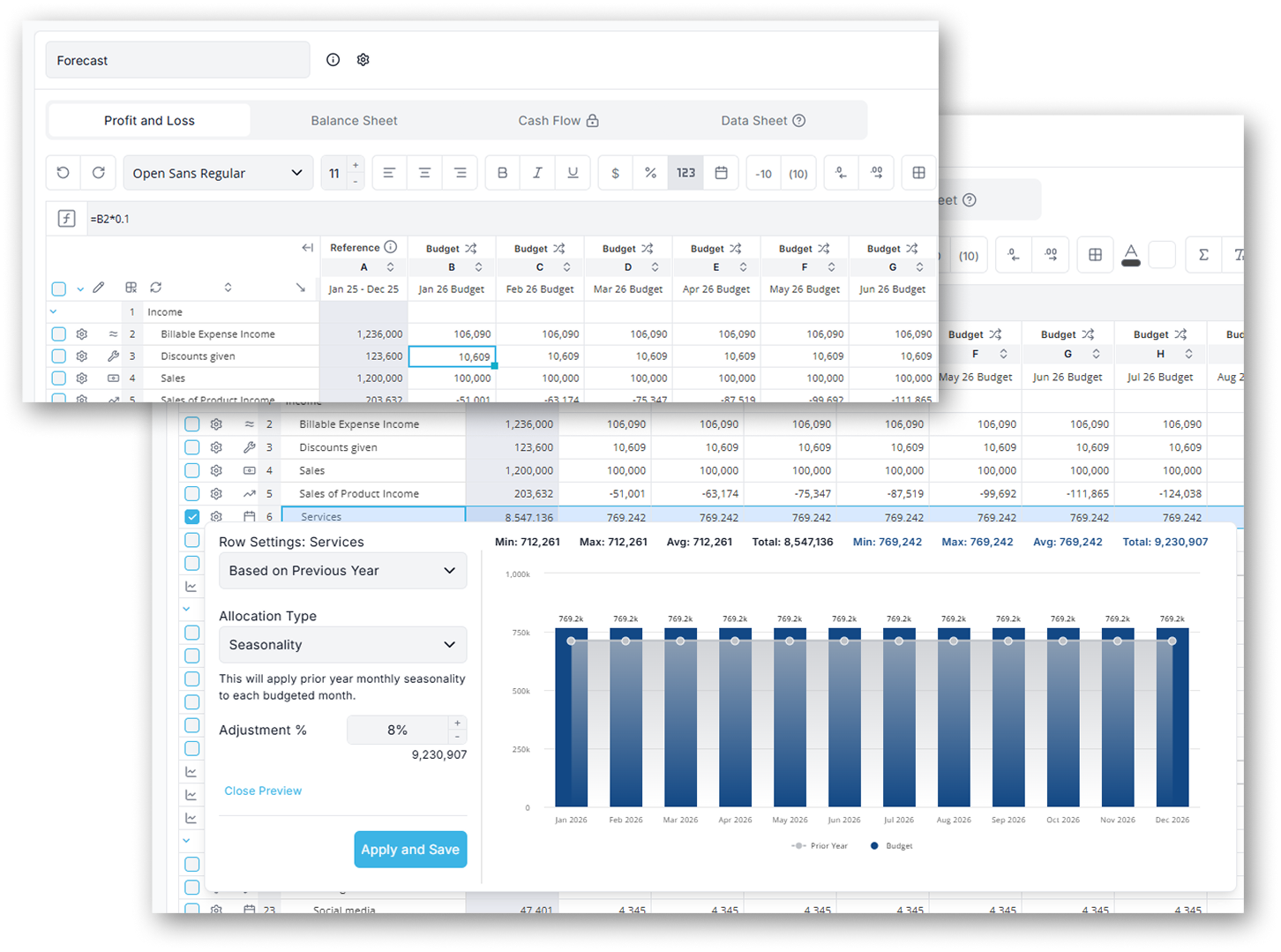
Reach Reporting gives you more control over the model. Build budgets and forecasts in a familiar spreadsheet-style workspace. As the plan changes, Reach updates the balance sheet and cash forecast—while keeping actuals, reports, and dashboards connected.
Fathom provides a more guided forecasting workflow. Start with a baseline forecast, then add drivers, scenarios, and microforecasts for specific events such as hiring an employee, purchasing equipment, taking out a loan, or raising capital.
BUILT FOR THE PEOPLE MANAGING THE NUMBERS
Powerful financial reporting without unnecessary complexity
Get started without rebuilding everything. Go from connected data to useful reporting quickly. Built for small business owners and financial managers who need clear reporting.
Connect familiar data systems
Bring in financial data from QuickBooks, Xero, Digits, spreadsheets, or trial balance imports.
Start with proven templates
Use ready-made reports and dashboards as a starting point instead of building every report from scratch.
Customize what matters
Adjust metrics, layouts, charts, comparisons, and reporting to reflect how you manage your business.
Build from reporting into planning
Start with the financial visibility you need today, then add budgeting, forecasting, benchmarking, or consolidation when you need them.
SIMPLE, PUBLIC PRICING
Start with the complete Reach platform
Every new account begins with 30 days of access to the complete Reach Reporting platform.
After your free trial, continue with the complete platform starting $149 per month. If you do not subscribe, your account automatically moves to Reach Basic.
No credit card required. No need to cancel.
Complete Reach Reporting
STRAIGHT ANSWERS
Frequently asked questions
Is Reach Reporting a FathomHQ alternative?
Yes. Reach Reporting overlaps directly with Fathom across financial reporting, dashboards, analysis, 3-way forecasting, and consolidation. Reach places additional emphasis on flexible report customization, reusable reporting workflows, and bringing reporting, planning, analysis, and sharing together in one workspace.
Does Reach offer true 3-way forecasting?
Yes. Reach connects forecast P&L, Balance Sheet and Cash Flow statements rather than treating cash flow forecasting as a standalone model. Fathom also provides genuine three-way forecasting.
Does Reach Reporting work with QuickBooks and Xero?
Yes. Reach Reporting integrates directly with QuickBooks Online, QuickBooks Desktop, Xero, MYOB, Gusto, and Digits, making it possible to bring accounting data into reports, dashboards, and forecasts without relying on manual exports each reporting period.
Is Reach Reporting suitable for a single business?
Yes. Reach Reporting can be used to manage financial reporting, dashboards, budgeting, and forecasting for a single company. You can start with the reporting and planning tools you need today, while capabilities such as multi-entity consolidation are available if your reporting needs become more complex.
Which has stronger intercompany eliminations?
Both support eliminations. Reach currently documents full-account eliminations but not partial amounts; Fathom documents both automated full-account and manual partial eliminations. Businesses that require partial eliminations should account for that distinction when comparing the two platforms.
Can I test Reach before switching?
Reach offers a 30-day trial with no credit card required; Fathom advertises a 14-day trial.
In order to help you the best, tell us what kind of business would describe you?