
A PROVEN CASH FLOW FROG ALTERNATIVE
Cash Flow Frog vs. Reach Reporting
Looking for simple cash flow forecast software? Compare Cash Flow Frog with Reach Reporting for cash flow planning, connected 3-way forecasting, client-ready reports, and financial analysis in one workspace.
- Cash flow forecasting and planning
- Connected 3-way forecasting
- Client-ready reports and dashboards
Trusted across leading accounting platforms and software marketplaces
FROM RAW DATA TO A DECISION
Turn financial data into decisions
Connect, automate, customize, understand, and plan—all from one financial reporting workspace.
Connect your data
Connect QuickBooks, Xero, Digits, MYOB, use a spreadsheet, or upload a CSV trial balance. Bring financial, non-financial, and operational data together.
Automate repeatable work
Start with pre-built reports and dashboards, sync current data, and reuse the work every month.
Make reports your own
Shape statements, KPIs, charts, comparisons, live text, branding, and complete financial decks.
Understand what the numbers are telling you
Use interactive metrics, variance analysis, drill-down, and clear context to understand performance and make better-informed business decisions.
Plan all three statements
Budget and forecast the P&L, balance sheet, and cash flow together, then test the drivers.
Scale reporting when you need to
Keep pace with changing business requirements, as Reach adapts with minimal manual intervention. Templates scale to support expanding reporting workloads and analytics needs.
SIDE-BY-SIDE
A comparison built for an actual decision
Cash Flow Frog and Reach Reporting both help you turn accounting data into reports, dashboards, analysis, budgets, and forecasts.
The difference is how much control you want over the result.
Report building Reach Reporting supports Report building Cash Flow Frog does not include Report building
More control. Start with templates, then shape layouts, calculations, visuals, and live text on one canvas.
Build cash reports and forecasts for liquidity decisions.
Native financial statement customization Reach Reporting supports Native financial statement customization Cash Flow Frog does not include Native financial statement customization
Unlock statements for one-off layouts, or keep locked statements presentation-ready while numbers refresh with Book Month.
Cash reporting is the focus. Full Profit & Loss and Balance Sheet row editing is limited.
Account mapping Reach Reporting supports Account mapping Cash Flow Frog supports Account mapping
Override the company-wide chart of accounts for reporting without changing bookkeeping. The Account Mapping Tool feeds the Data Picker and locked statements. Mapping is unavailable for CSV and MYOB connections.
Classify accounts for consistent cash reporting.
Three-way planning Reach Reporting supports Three-way planning Cash Flow Frog partially supports Three-way planning
Connect Profit & Loss, Balance Sheet, and Cash Flow in one plan. Assumption changes flow through to projected ending cash.
Run cash projections and scenarios. Full linked three-statement planning is limited.
Supporting data across reporting and planning Reach Reporting supports Supporting data across reporting and planning Cash Flow Frog supports Supporting data across reporting and planning
Bring non-accounting inputs into reports, dashboards, and plans with company data sheets and planning data sheets, plus linked Google Sheets where you use them.
Bring cash assumptions and spreadsheet imports into plans.
Scenario modeling Reach Reporting supports Scenario modeling Cash Flow Frog supports Scenario modeling
Duplicate budgets or forecasts for base, upside, and downside cases. Vary planning Data Sheet assumptions without rebuilding the model.
Run cash scenarios as a core workflow.
Client delivery and collaboration Reach Reporting supports Client delivery and collaboration Cash Flow Frog supports Client delivery and collaboration
Share reports, dashboards, budgets, and forecasts through a dedicated Client Portal with folders, alerts, and PDF download for reports.
Share cash views with your team and stakeholders.
Interactive dashboards for client users Reach Reporting supports Interactive dashboards for client users Cash Flow Frog supports Interactive dashboards for client users
Publish interactive dashboards to the Client Portal or shareable links, with filters, exports, and AI analysis where you enable them.
Give viewers cash dashboards for liquidity tracking.
Multi-entity and multi-currency consolidations Reach Reporting supports Multi-entity and multi-currency consolidations Cash Flow Frog supports Multi-entity and multi-currency consolidations
Combine compatible companies into one reporting view, with mapping and multi-currency conversion where supported.
Consolidate entity cash across the group.
Eliminations Reach Reporting supports Eliminations Cash Flow Frog partially supports Eliminations
Zero out designated intercompany accounts in a consolidation. Reach eliminates full account balances; Cash Flow still shows eliminated accounts today.
Cash consolidation is available. Full intercompany eliminations are limited.
Custom branding Reach Reporting supports Custom branding Cash Flow Frog supports Custom branding
Apply company or workspace logos and color themes to reports and dashboards inside the Reach experience.
Brand cash reports for stakeholder delivery.
White label Reach Reporting supports White label Cash Flow Frog partially supports White label
Replace Reach app identity with your logo, favicon, and custom subdomain. Paid premium service with a $2,500 one-time setup.
Present cash packs under your firm identity.
Benchmarking Reach Reporting supports Benchmarking Cash Flow Frog supports Benchmarking
Benchmark with peer consolidations, imported industry data, KPI goals or ranges, budgets as targets, and conditional formatting.
Compare cash performance across entities and periods.
AI enhancement Reach Reporting supports AI enhancement Cash Flow Frog supports AI enhancement
Analyze metrics, generate report and dashboard deliverables, and build dashboard widgets with Claude where enabled.
Use AI and MCP connector positioning to speed cash commentary.
QuickBooks Online Reach Reporting supports QuickBooks Online Cash Flow Frog supports QuickBooks Online
Direct cloud connection with overnight auto-sync and manual sync.
Connect QuickBooks Online for your edition.
QuickBooks Desktop Reach Reporting supports QuickBooks Desktop Cash Flow Frog supports QuickBooks Desktop
Direct connection through the Reach Desktop Connector on the machine holding the company file.
Connect QuickBooks Desktop paths covered in help.
Xero Reach Reporting supports Xero Cash Flow Frog supports Xero
Direct cloud connection with auto-sync about every 24 hours and manual sync.
Connect Xero paths covered in help.
MYOB Reach Reporting supports MYOB Cash Flow Frog supports MYOB
Direct cloud connection. Several data types are not synced; Account Mapping Tool is unavailable.
Connect MYOB where your books live in that ledger.
Gusto Reach Reporting supports Gusto Cash Flow Frog supports Gusto
Direct payroll connection for employee and contractor metrics, with nightly auto-sync.
Bring Gusto payroll figures into cash plans.
Digits Reach Reporting supports Digits Cash Flow Frog does not include Digits
Direct Digits connection for financial statements used in reporting, dashboards, and 3-way forecasts.
Digits is not part of the current connector set.
CSV trial balance import Reach Reporting supports CSV trial balance import Cash Flow Frog supports CSV trial balance import
Upload a trial balance CSV to build the three main statements. NetSuite, Sage Intacct, Wave Accounting, FreshBooks, Zoho Books, ZipBooks, and other accounting systems can be formatted as a trial balance CSV and uploaded into Reach Reporting.
Import CSV or trial-balance files for ledgers without a direct connector.
Google Sheets integration Reach Reporting supports Google Sheets integration Cash Flow Frog supports Google Sheets integration
Link a native Google Sheet for metrics and live text, with manual sync plus documented nightly sync.
Pull supporting metrics from Google Sheets into cash plans.
Microsoft Excel imports Reach Reporting supports Microsoft Excel imports Cash Flow Frog supports Microsoft Excel imports
Upload Excel as a Data Sheet and re-upload when figures change. This is a manual path, not a live Excel connection.
Import Microsoft Excel paths covered in help.
Onboarding and implementation Reach Reporting supports Onboarding and implementation Cash Flow Frog supports Onboarding and implementation
Get guided onboarding, implementation help, and live training shaped around your reporting needs.
Get guided setup when you stand up the first cash model.
Live one-on-one support Reach Reporting supports Live one-on-one support Cash Flow Frog supports Live one-on-one support
Reach a person by live chat, email, phone, or Zoom when you need troubleshooting or a better build path.
Reach support during cash forecasting cycles.
Training as you grow Reach Reporting supports Training as you grow Cash Flow Frog supports Training as you grow
Continue with webinars, tutorials, and personalized training as you add users, clients, and advanced workflows.
Keep learning with knowledge base and follow-on training options.
Choose Reach if...
You want linked statements and a dedicated client workspace
You need client-specific statement structures and a dedicated client portal for recurring advisory delivery.
You want reporting, connected three-statement planning, and a dedicated client workspace in one recurring process.
You brand and deliver standard or custom packs with open formatting and supported accounting sources.
You want clear connection-based tiers ($149 / $290 / $550) and a 30-day trial with no credit card.
CHOOSE CASH FLOW FROG IF…
You want a focused cash-liquidity forecast
You want simple cash-liquidity forecasting.
You will keep full statements in another system.
You want basic cash scenarios and group liquidity.
You prefer a cash-only workflow and price.
From people who compared both
What Reach customers say about reporting
See why people chose Reach Reporting over Cash Flow Frog.

Straight Forward
“This is such an easy add in to use and links with the data in Xero seamlessly. The team have been great at supporting us and getting us started.”
Emma Gardiner · Finance leader
Delightful
“Reach is so delightful to use and is such a game-changer when providing client service.”
Danielle Wright · Finance leader
A Great Partner in Financial Planning and Analysis
“Reach Reporting has been a transformative tool in my financial planning and analysis work. Its user-friendly interface stands out for its intuitiveness and ease of navigation.”
Anne Nicole Suba · FP&A
Efficient Financial Reporting Tool with Exceptional Support Team
“I've recently started using this tool for automating financial reporting, and it's been a game-changer. The automation features have significantly streamlined our reporting processes.”
Marinella Claudio · Finance leader
Usability!
“Love how Reach easily pulls into QBO and its ease of use!”
Matthew Ratsimbajaona · Finance leader
Great Experience
“New user to Reach however amazing experience.”
Smita Dias · Finance leader
Reporting
Which reporting workflow fits the way you work?
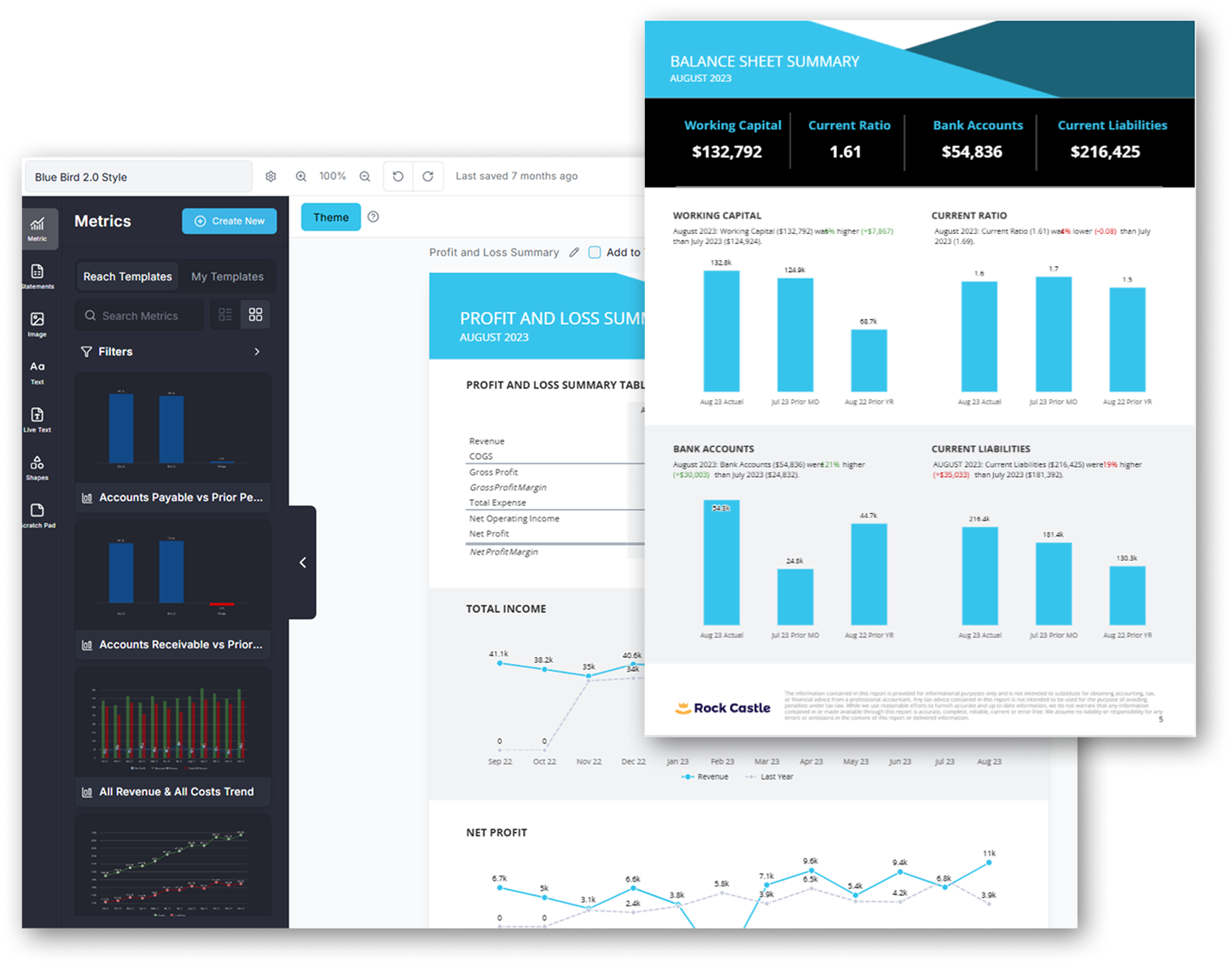
Cash Flow Frog and Reach both turn finance data into decisions stakeholders can use. Cash Flow Frog is most relevant when the business wants a clear view of money coming in and going out. Reach addresses a broader reporting job across statements and operational measures.
The useful test is how each system handles a real recurring client pack, including narrative and permissions. Never claim Cash Flow Frog has no portal.
Reach gives you more control per client. Start with a proven template, then customize the layout, metrics, calculations, account groupings, visuals, live text, and supporting business data, and deliver through a dedicated client portal.
Forecasting
How will you build and maintain the plan?
Reach connects the profit and loss, balance sheet, and cash flow statement in one planning workflow. Cash Flow Frog documents cash forecasting and scenarios; a complete linked three-way planning engine was not established — soft partial, never invent ✗ or claim full 3-way from cash alone. Test the timing of real receivables and payables in both tools. The difference is how you build and manage the plan.
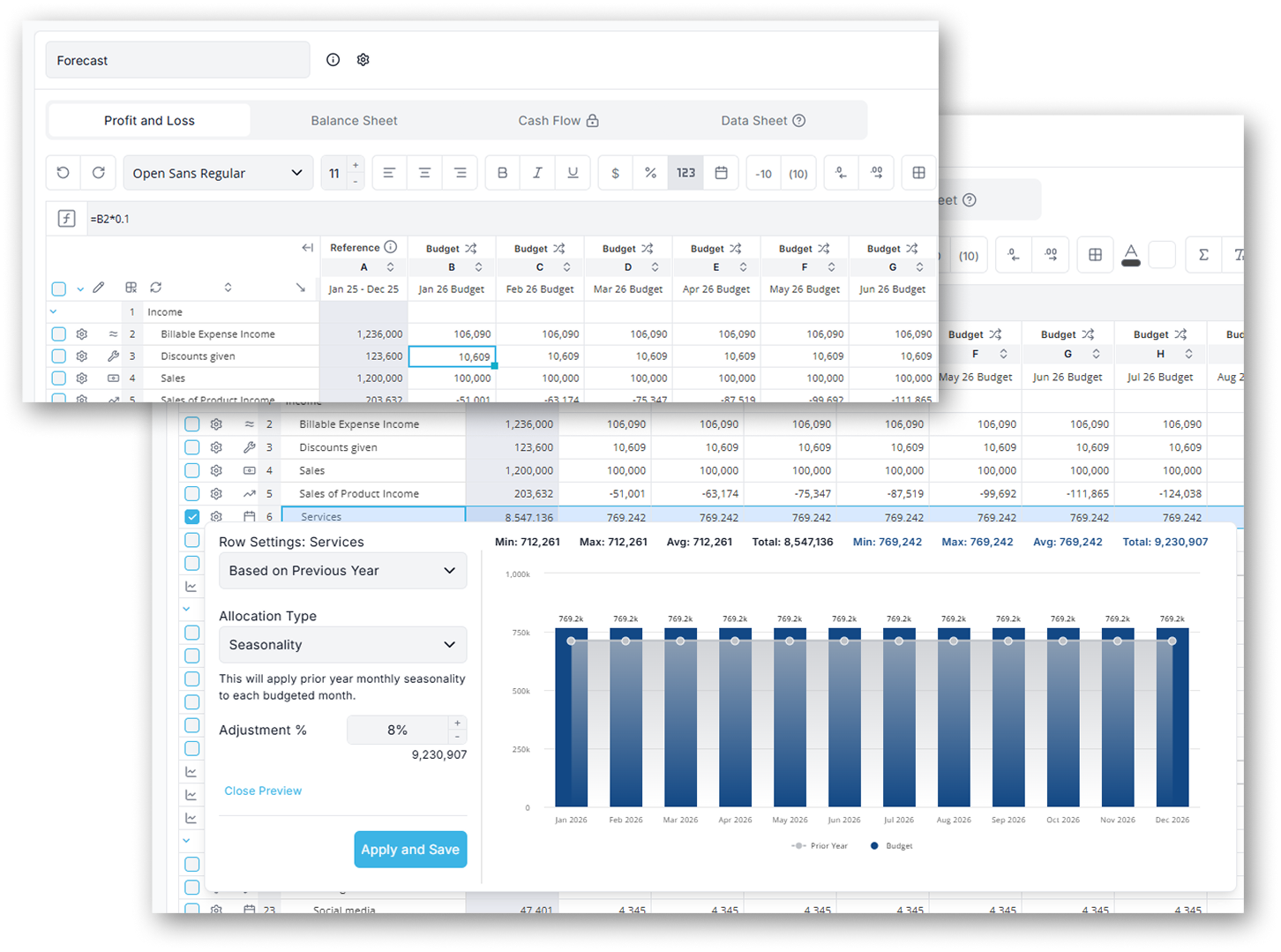
Reach Reporting gives you more control over the model. Build budgets and forecasts in a familiar spreadsheet-style workspace. As the plan changes, Reach updates the balance sheet and cash forecast—while keeping actuals, reports, and dashboards connected.
Cash Flow Frog provides a more guided forecasting workflow. Start with a baseline forecast, then add drivers, scenarios, and microforecasts for specific events such as hiring an employee, purchasing equipment, taking out a loan, or raising capital.
BUILT FOR THE PEOPLE MANAGING THE NUMBERS
Powerful financial reporting without unnecessary complexity
Get started without rebuilding everything. Go from connected data to useful reporting quickly. Built for small business owners and financial managers who need clear reporting.
Connect familiar data systems
Bring in financial data from QuickBooks, Xero, Digits, spreadsheets, or trial balance imports.
Start with proven templates
Use ready-made reports and dashboards as a starting point instead of building every report from scratch.
Customize what matters
Adjust metrics, layouts, charts, comparisons, and reporting to reflect how you manage your business.
Build from reporting into planning
Start with the financial visibility you need today, then add budgeting, forecasting, benchmarking, or consolidation when you need them.
SIMPLE, PUBLIC PRICING
Start with the complete Reach platform
Every new account begins with 30 days of access to the complete Reach Reporting platform.
After your free trial, continue with the complete platform starting $149 per month. If you do not subscribe, your account automatically moves to Reach Basic.
No credit card required. No need to cancel.
Complete Reach Reporting
STRAIGHT ANSWERS
Frequently asked questions
Is Reach Reporting a Cash Flow Frog alternative?
Yes, where your needs overlap with financial reporting and planning. Reach is worth testing for linked financial statements and a broader reporting and client-delivery workflow. Cash Flow Frog deserves consideration for a focused cash forecast with broad accounting-source options. Compare a real recurring task before deciding.
Does Reach offer connected three-way planning?
Yes. Reach connects P&L, balance-sheet movements, and cash in one planning workflow. Cash Flow Frog documents cash forecasting and scenarios; a complete linked three-way planning engine was not established — soft contrast only, never invent ✗ or claim full 3-way from cash alone. Compare a worked example including funding and working capital.
Can I use my accounting data when moving from Cash Flow Frog?
Yes. Reach names QBO, QBD, Xero, MYOB, Digits, and Gusto among its connections, plus Sheets/Excel/CSV. Cash Flow Frog help covers QBD, Xero, Sage Intacct, Zoho, and Excel paths. Verify your ledger edition before switching. Existing reports and models should not be assumed to transfer automatically.
Is Reach suitable for owners and finance teams focused on liquidity?
It can be, if reporting, planning, and delivery requirements fit the documented product. Start with one representative company and its hardest recurring report. Cash Flow Frog may still fit better where a focused cash forecast with broad accounting-source options is central.
Which difference deserves the closest evaluation?
Start with Reach’s linked financial statements and broader reporting and client delivery as the evaluation frame. Then confirm whether Cash Flow Frog’s focused cash forecast is essential. Revenue-based pricing and connector differences can change the quote. Cash consolidation is not the same as consolidated financial statements with ownership accounting and intercompany eliminations. Compare a worked example rather than a generic feature score.
Can I test Reach before switching from Cash Flow Frog?
Reach offers a 30-day free trial with no credit card required. Cash Flow Frog offers a 14-day free trial with no credit card. Confirm the buyer’s revenue band and connector terms at checkout. A money-back guarantee is a separate policy, not a longer free trial. Plan rebuild time if you switch. Reports and models do not auto-transfer.
In order to help you the best, tell us what kind of business would describe you?